Memory Intelligence for AI Coding Agents.
Inspect what your agents know. Find context worth preserving. Move it between sessions, machines, and agents.


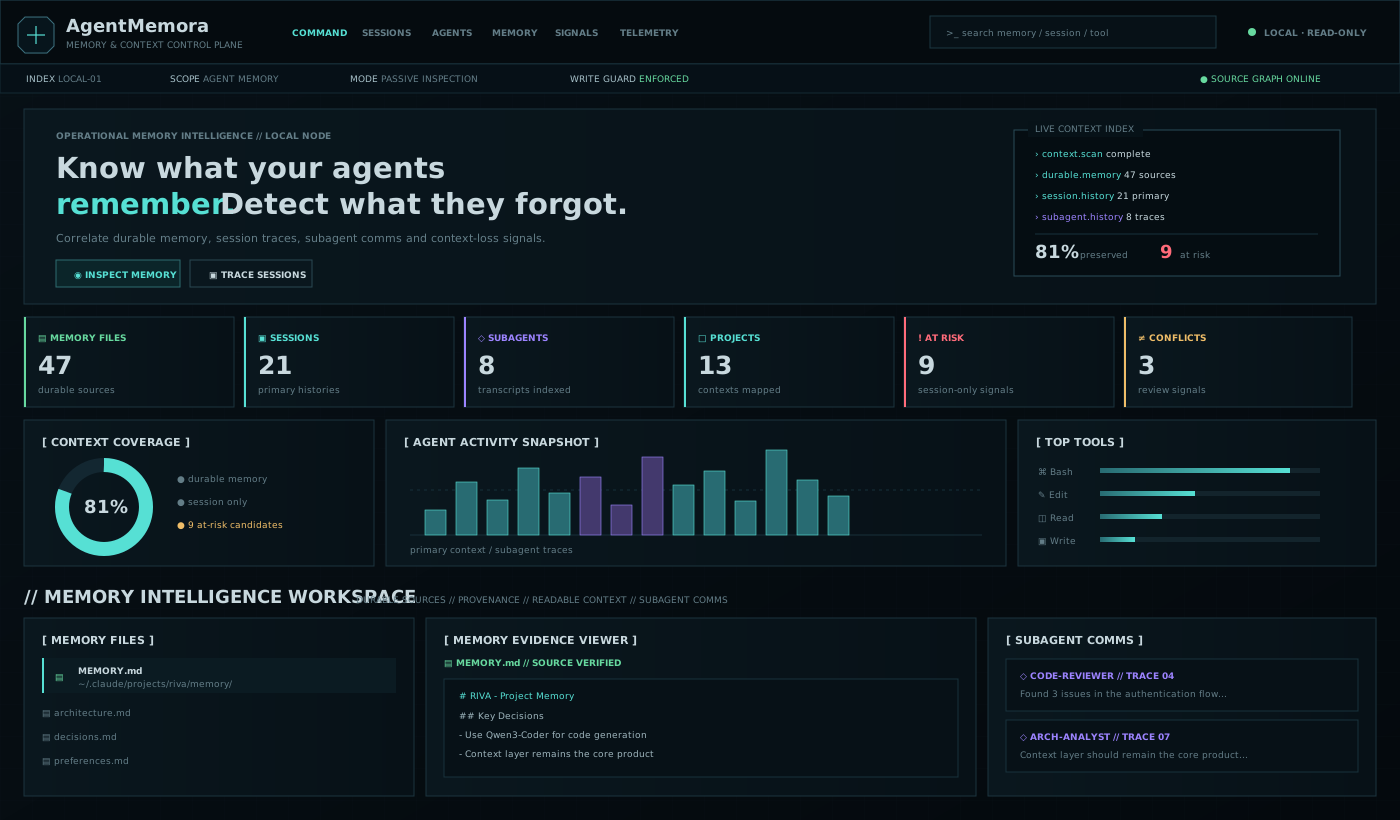
AgentMemora is a local-first memory intelligence layer for coding agents. It reads the state your tools already create — session transcripts, auto-memory, project instructions, rules, and runtime memory events — and turns it into a control plane for inspection, curation, preservation, and transfer.
It is deliberately not another memory database and it is not primarily a token/tool analytics dashboard.
Session history          Durable memory           Project context
Claude JSONL             Auto memory              CLAUDE.md / AGENTS.md
      |                       |                         |
      +-----------------------+-------------------------+
                              |
                    AgentMemora Intelligence
                              |
             +----------------+----------------+
             |                |                |
       Context risks      Conflicts       Context Capsules
             |                |                |
             +-------- Curate / Preserve / Transfer ----+
Prerequisite: Node.js 20+.
npx -y agentmemora@latestNo account. No API key. No telemetry. The dashboard opens locally on 127.0.0.1:8765, and vendor session logs remain read-only.
Want to inspect the environment first?
npx -y agentmemora@latest doctorThe first useful path is intentionally simple:
Choose a project
      ↓
Inspect its primary sessions + every indexed subagent trace
      ↓
Compare session-only context with durable memory/instructions
      ↓
Resume / Fork / export a Context Capsule before useful context is lost
The dashboard groups local history by project first, so you do not have to hunt through one global session stream.
AgentMemora focuses on the questions that appear after an agent has worked with you for a while:
- What does this agent currently know about my project?
- Which important decisions exist only inside an old session?
- What may disappear when I start a fresh session or compact context?
- Do memory files disagree with each other?
- Which repeated user corrections should become durable memory?
- How do I continue the exact session, fork it, or carry only the useful context forward?
- How do I move selected context without copying an entire raw transcript?
Session/tool/model statistics remain available as supporting evidence, but memory lifecycle is the product center.
AgentMemora currently combines supported durable sources with Claude Code local session history and produces a Memory Posture view. The project-first explorer groups primary sessions and subagent traces by local project so you can see the full context footprint before opening individual histories:
- durable memory and instruction inventory
- session-only memory candidates
- context-loss risk candidates
- conservative
key: valueconflict detection across durable sources - stale memory detection (90+ days)
- provenance for every source
- session → memory coverage estimate
- project-level session and subagent inventory
- exact-session Resume and Fork commands
- deterministic Context Capsule export
Candidate/risk detection is intentionally heuristic and is labeled as such. AgentMemora does not pretend that a regex is semantic truth.
The default dashboard is organized as a compact memory intelligence console rather than a generic analytics platform: top command navigation, an operational status rail, dense memory/session/subagent posture, recent context activity, then a Memory Intelligence Workspace where durable files, readable source evidence, provenance, and subagent comms sit side by side. The visual language is deliberately terminal-inspired and intelligence-oriented without turning into a neon hacker theme. Tool/model analytics stay lower in the page as supporting telemetry.
A Context Capsule is a portable Markdown handoff extracted from a local session. It contains provenance, user intent/constraints, recent working state, and a tool footprint while intentionally excluding raw tool results.
Create one from the CLI:
agentmemora capsule --session <session-id> --output project-context.mdOr use CONTEXT CAPSULE on a session card in the dashboard.
A capsule is designed for a fresh Claude/Codex/Cursor session, another machine, a teammate, or an archived project handoff. It is not a byte-for-byte vendor session migration.
For Claude Code sessions AgentMemora exposes three distinct workflows:
Resume   -> continue the exact saved conversation
Fork     -> copy conversation history into a new branch/session
Transfer -> create a clean portable Context Capsule
The dashboard gives copyable commands for the first two and a downloadable capsule for the third.
AgentMemora never edits Claude Code JSONL transcripts. Those are treated as vendor-owned history artifacts.
For explicit memory/instruction files, curation is opt-in and guarded:
agentmemora promote \
  --target ~/.claude/projects/<project>/memory/MEMORY.md \
  --text "- Use pnpm for this project" \
  --yes
Or promote a reviewed capsule/file:
agentmemora promote \
  --target ~/.claude/projects/<project>/memory/MEMORY.md \
  --from reviewed-memory.md \
  --yes
Before an existing target is modified, AgentMemora writes a backup into a sibling .agentmemora-backups/ directory. Without --yes, the write is refused. Targets are restricted to recognized memory/instruction paths such as MEMORY.md, CLAUDE.md, and memory/ / memories/ directories.
~/.claude/projects/**/*.jsonlsession transcripts~/.claude/projects/<project>/memory/**/*.mdauto memoryCLAUDE.md- primary session vs subagent distinction
- prompts, readable assistant text, tool names, model/token metadata
- Resume/Fork command generation
- Context Capsule export
AGENTS.mdGEMINI.mdand~/.gemini/GEMINI.md.github/copilot-instructions.md.github/instructions/**/*.instructions.md$HOME/.copilot/....cursor/rules/**$CODEX_HOME/memories/**(default~/.codex/memories/**)- generic explicit
MEMORY.md
AgentMemora does not blindly crawl the computer. It does not intentionally scan .env, SSH keys, browser credential stores, keychains, or arbitrary documents.
# Full control-plane dashboard
agentmemora

# Select an additional workspace
agentmemora scan --path /path/to/project

# Focus on Claude session inventory
agentmemora sessions

# Export selected session context
agentmemora capsule --session <id> --output context.md

# Curate reviewed text into durable memory (backup + explicit confirmation)
agentmemora promote --target <MEMORY.md> --text "..." --yes

# Environment/safety check
agentmemora doctorA saved session and durable memory are different things. Claude Code stores local conversations as JSONL under ~/.claude/projects/; a fresh session starts with a fresh conversation context, while persistent instructions/auto-memory can be loaded again. AgentMemora makes that boundary visible instead of treating every artifact as the same kind of “memory.”
That enables a useful workflow:
Discover -> Understand -> Curate -> Preserve -> Transfer -> Resume anywhere
The existing Python SDK remains available for advanced runtime instrumentation beside systems such as Mem0 and LangGraph/LangMem.
from agentmemora import AgentMemora

lens = AgentMemora("agentmemora.db")
lens.remember(key="project.database", value="PostgreSQL", source="conversation#23", confidence=0.94)
lens.remember(key="project.database", value="MongoDB", source="conversation#41")

for hit in lens.recall("what database does the project use?"):
    print(hit.memory.value, hit.score, hit.reason)
Raw external-provider payloads/search queries are not persisted by default.
- local-first
- dashboard binds to
127.0.0.1 - no telemetry by default
- vendor session JSONL is read-only
- no blind home-directory crawl
- memory mutation requires an explicit target +
--yes - existing memory is backed up before modification
- Context Capsules exclude raw tool results by default
npm run test:node
node ./bin/agentmemora.js --no-open
node ./bin/agentmemora.js sessions --no-open
Python SDK:
python -m venv .venv
pip install -e '.[dev]'
pytest -qv0.2 focuses on making local context understandable: project-first navigation, complete indexed subagent visibility, compact session browsing, and a clear first-run workflow. Next: reviewed candidate → memory promotion from the UI, semantic conflict analysis, selective Context Surgery, cross-agent capsule adapters, memory diff/rollback, secret/PII redaction hooks, and memory regression checks.
See ROADMAP.md.
Agent context is working state. Important state should be inspectable, preservable, portable, and under the developer's control.
MIT