English · Deutsch · 简体中文 · 日本語
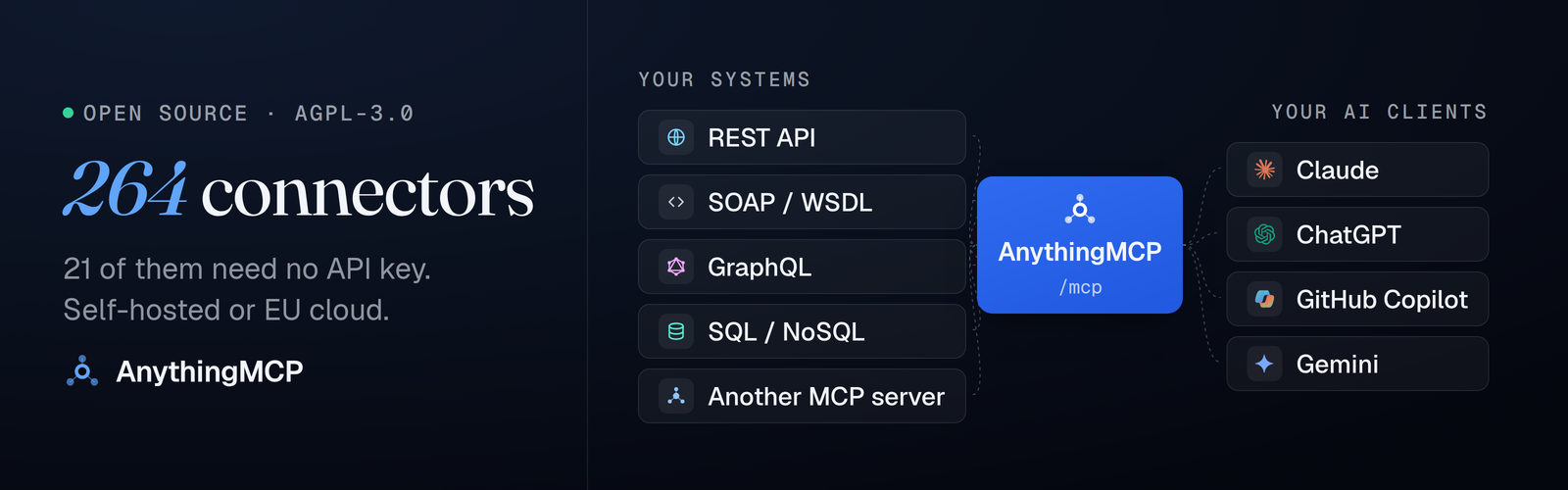
Turn any REST/OpenAPI, SOAP, GraphQL or SQL API into MCP tools for Claude, ChatGPT and Copilot.
A self-hosted MCP server and gateway, no code, 264 ready connectors including ERP and e-commerce: SAP Business One, Odoo, Xentral, weclapp, Shopware, WooCommerce, Amazon Seller, Kaufland and more.





Claude answering a question no chatbot could answer, because the data lives in a field-service system that speaks REST, not MCP:

Run it yourself — three lines, no clone, details below:
mkdir anythingmcp && cd anythingmcp
curl -fsSLo docker-compose.yml \
  https://raw.githubusercontent.com/HelpCode-ai/anythingmcp/main/docker-compose.quickstart.yml
printf 'JWT_SECRET=%s\nENCRYPTION_KEY=%s\n' "$(openssl rand -hex 32)" "$(openssl rand -hex 32)" > .env
docker compose up -d   # → http://localhost:3000
Three words appear throughout and mean three different things:
- an adapter is one of the 264 JSON definitions that ship in this repo — SAP Business One, Odoo, weclapp, Xentral, Shopware, WooCommerce, Amazon Seller, DHL and the rest. 21 of them need no API key at all; the others ask for your credentials at import.
- a connector is an adapter, or your own OpenAPI spec / Postman collection / WSDL / GraphQL endpoint / database, once you have configured it in your workspace. Anything you can point at, in minutes, without writing an MCP server.
- an MCP server is the URL you hand to Claude. It exposes the connectors you assign to it, and nothing else.
Everything runs on your infrastructure, so you decide what leaves it. Per-tool response mapping declares which fields ever reach the model; credentials are AES-256-GCM at rest; the audit log keeps the full upstream response on your side. OAuth2, RBAC, SSO and SCIM are in the self-hosted build, not held back for a paid tier.
In production at KOCH Freiburg GmbH, where it connects AI assistants to 15+ internal systems — ERP, CRM, SOAP services and on-prem databases. AnythingMCP was extracted from that system by helpcode.ai in Freiburg, Germany, and open-sourced because an adapter catalog grows faster as a community than as a product.
The recommended path, and the one measured below. Requires Docker 24+ and openssl; on macOS, start Docker Desktop first.
mkdir anythingmcp && cd anythingmcp
curl -fsSLo docker-compose.yml \
  https://raw.githubusercontent.com/HelpCode-ai/anythingmcp/main/docker-compose.quickstart.yml
printf 'JWT_SECRET=%s\nENCRYPTION_KEY=%s\n' "$(openssl rand -hex 32)" "$(openssl rand -hex 32)" > .env
docker compose up -d
Open http://localhost:3000 and register — the first account becomes admin.
Keep the generated
.env.ENCRYPTION_KEYis what decrypts the credentials you store. Lose it and every connector has to be re-credentialed; back it up wherever you keep your other secrets.
| Service | Default URL |
|---|---|
| Web UI | http://localhost:3000 |
| MCP endpoint | http://localhost:4000/mcp |
| Swagger docs | http://localhost:4000/api/docs |
Measured on amd64: 31 s to pull the image, 24 s to a healthy API and a login page. The published image is amd64 only for now — the compose file pins the platform so it also runs on Apple Silicon under Docker Desktop's emulation, where the same boot took 24 s on an M-series laptop but can take a few minutes on older hardware.
The quickstart binds to 127.0.0.1 on purpose: nothing in front of it terminates TLS. For an instance other people or a cloud AI client can reach, clone the repo and run ./setup.sh — it asks for a domain, gets certificates through Caddy, generates the secrets and sets the MCP auth mode. See the Deployment Guide.
Other ways to deploy — managed cloud, Railway, DigitalOcean
AnythingMCP Cloud is the same AGPL code, operated by us in Frankfurt, Germany. Start there to see it work on your own APIs without provisioning anything, and move it in-house when you want the credentials to stop travelling — the connectors are the same either way. DPA/AVV on request via info@helpcode.ai. SSO and SCIM are self-hosted only.


Most companies have no MCP servers yet. They have a REST API, an ERP, a SOAP service and a database. Each of them becomes a set of MCP tools, and one MCP server URL hands them to Claude, ChatGPT or Copilot.
Import an OpenAPI 3.x or Swagger 2.0 spec, by URL or by pasting it, and every operation becomes an MCP tool with its parameters, auth and endpoint mapping filled in. Rename and describe the tools in the visual editor so the model picks the right one. REST connector docs · guide · 5-minute demo: openapi-to-mcp
Point AnythingMCP at a WSDL and each SOAP operation becomes a tool: envelopes, parameter order and WCF services are handled for you, with Basic, Bearer or API-key auth. That is how a SOAP service from 2009 ends up in front of a 2026 model, in minutes rather than weeks. SOAP connector docs · guide · 5-minute demo: soap-to-mcp
PostgreSQL, MySQL, MariaDB, SQL Server, Oracle, SAP HANA, SQLite and MongoDB. The connector generates schema, example and query tools; you decide whether the model writes SQL or only fills in the parameters of queries you wrote. Query tools are read-only by default: AnythingMCP runs a single SELECT and blocks writes and stacked statements. Add a read-only database user and a role that sees only the tools it needs. Database connector docs · SAP HANA · guide · 5-minute demo: sql-to-mcp
Introspection turns the queries and mutations of a GraphQL endpoint into MCP tools, or you define the operations yourself. GraphQL connector docs · guide
Import a Postman v2.1 collection: folders, auth, body modes and {{variables}} carry over, and every request becomes a tool. cURL commands work the same way. Postman import docs
Ready adapters for the ERPs behind most order, stock and invoice questions. Install one, add your credentials, and the tools are live on your MCP server. Each name links to its setup guide.
| System | Market | Tools | What the AI can do |
|---|---|---|---|
| SAP Business One | Global | 12 | Business partners, items, orders, invoices, quotations, deliveries; create sales orders |
| SAP S/4HANA Cloud | Global | 15 | Business partners, sales and purchase orders, billing documents, deliveries, journal entries |
| Odoo | Global | 11 | Any model: partners, sales orders, invoices, products; create and update |
| Microsoft Dynamics NAV | Global | 6 | Any published OData page: customers, items, sales orders; create and update |
| ERPNext | Global | 11 | Any DocType: customers, sales orders, invoices, items, stock |
| Dolibarr | Global | 10 | Third parties, invoices, orders, proposals, products, stock |
| JTL-Wawi † | DE | 9 | Items, stock per warehouse, customers, sales orders, shipments |
| Xentral | DE | 7 | Articles, customers, sales orders, invoices, stock |
| weclapp | DACH | 11 | Customers, sales orders, invoices, articles, quotations, opportunities |
| Sage 100 † | DE | 6 | Addresses, items, sales documents, any Web API entity |
| Haufe X360 † | DE | 7 | Customers, stock items, sales orders, invoices, shipments |
| ScopeVisio | DE | 6 | Contacts, invoices, projects, tasks |
| AFAS Profit † | NL | 6 | Any GetConnector: debtors, invoices, employees |
| Zucchetti † | IT | 6 | Anagrafiche, documents, items |
| TeamSystem † | IT | 6 | Customers, suppliers, invoices, items |
| Axonaut † | FR | 9 | Companies, invoices, quotations, expenses, products, projects |
† Built from the vendor's published API documentation and not yet exercised against a live tenant. If you run one of these, a report or a fix is very welcome.
Repositories: erp-mcp-server · weclapp-mcp-server · odoo-mcp-server · sap-mcp-server · sap-business-one-mcp-server · xentral-mcp-server
Your ERP isn't listed, or it's a custom or on-prem build? Connect it through its REST API, SOAP services or straight to its SQL database, read-only. That is how KOCH Freiburg runs its ERP in production.
Shops and marketplaces, from Amazon and eBay to the DACH marketplaces. Each name links to its setup guide.
| System | Market | Tools | What the AI can do |
|---|---|---|---|
| Amazon Seller Central | Global | 15 | Orders, catalog, FBA inventory, offers, fees, financial events, reports |
| WooCommerce | Global | 49 | Products, variations, stock, orders, refunds, customers, reports |
| Shopware 6 | DACH | 6 | Storefront catalog via the Store API: products, categories, cross-sells |
| Magento 2 / Adobe Commerce | Global | 12 | Products, stock, orders, customers |
| BigCommerce | Global | 14 | Products, variants, inventory, orders, customers |
| eBay Sell | Global | 10 | Inventory, offers, orders, disputes, price updates |
| Etsy | Global | 9 | Listings, receipts (orders), reviews |
| Ecwid | Global | 10 | Products, categories, orders, customers |
| Kaufland Marketplace | DE | 8 | Orders and units, shipments, tickets, storefronts |
| OTTO Market † | DE | 8 | Orders, products, returns, stock and price updates |
| Zalando Direct Ship † | EU | 7 | Orders, shipments, returns, stock, prices |
| Billbee | DACH | 8 | Orders, products, customers, shipping providers |
| Mercado Libre | LATAM | 4 | Item search, seller orders |
† Built from the vendor's published API documentation and not yet exercised against a live seller account.
Repositories: ecommerce-mcp-server · amazon-seller-mcp-server · billbee-mcp-server · magento-mcp-server · woocommerce-mcp-server · shopware-mcp-server · kaufland-mcp-server · otto-market-mcp-server
- 6 connector types — REST, SOAP, GraphQL, OData (SAP Gateway included), Database, MCP-to-MCP bridge. Eight database engines: PostgreSQL, MySQL, MariaDB, MSSQL, Oracle, SAP HANA, MongoDB, SQLite.
- Import from what you already have — OpenAPI/Swagger, Postman, cURL, WSDL, GraphQL introspection, or tool discovery straight from a running MCP server.
- The adapter catalog — see what ships.
- Visual tool editor — map parameters to path, query, body and headers; rename and describe tools so the AI reads them the way you meant.
- Dynamic MCP server — tools register at runtime, no restart. Per-connector
{{VAR}}interpolation, hidden from the AI.
- Response shaping — declare per tool exactly which fields reach the model, with a live before/after preview.
- Read-only where it matters. Every tool carries MCP annotations (
readOnlyHint,destructiveHint), derived from the operation and overridable per tool, so a client can show the difference between reading an invoice and issuing a credit note. Role-based tool whitelisting lets you publish an MCP server that can only read — which is how most people should start with an ERP. - Every auth scheme you will meet — OAuth2 (PKCE and Client Credentials), Bearer, API Key, Basic, HMAC request signing, LOGIN_TOKEN and OAuth 1.0a.
- Audit logging — every tool call recorded with input, output, duration and status, in your own database.
- SSO and SCIM — Entra ID, Google, Okta, Auth0, generic OIDC. Roles sync from your directory groups on every sign-in; disable someone in the directory and their workspace access and MCP API keys die with it (self-hosted only).
- Knowledge Graph — a per-workspace, PII-safe map of how your connectors' data relates, served back to the agent as an MCP tool so it chains calls across systems correctly.
- AI skills — recurring usage turned into small reusable rules and composed into the server's instructions, so they guide the agent without adding a tool call (optional, opt-in).
Forwarding calls leaves the hard part to the agent: knowing which tool to call next, and what your business actually means by "open order" or "active customer". AnythingMCP learns both — how the data in your connectors relates, and how your team really uses the tools — then feeds that back to the AI client as context rather than as extra tool calls.
- Knowledge Graph — a per-workspace map of entities (customers, orders, products…) and their relationships. It builds itself from tool names, parameters and the input/output of real calls; an optional AI pass infers the cross-connector links heuristics miss. It stays PII-safe: it stores entity/field names and relationship metadata, never the values.
- Build it visually — a graph editor lets you create, edit and delete entities and connections by hand, add descriptions, and curate what the AI proposed.
- Served over MCP — each server exposes a
kg_how_to_obtaintool, so the customer's agent can ask "how do I get from a Shopware order to a DHL tracking number?" and receive chaining hints across connectors. - AI skills, written from real usage — with intent capture on, each tool call can record why it was made. An AI pass turns recurring patterns into small reusable rules (e.g. "today's revenue includes order statuses 2, 3 and 4"). You Apply, Edit or Dismiss each one, or let auto-apply take the high-confidence ones unattended. Applied skills are composed into the MCP server's instructions at serve time, so they guide the agent without adding a single tool call. The knowledge your team builds up by using the system stops living in someone's head.
The AI passes are off by default — opt in with a global env flag and a per-workspace switch, using OpenAI, OpenRouter or Anthropic. The graph, manual editing and the MCP tool work with no LLM key at all.
➡️ Knowledge Graph & AI skills guide →
Every tool can declare exactly which fields leave your infrastructure. The mapping is attached per tool and applied on the way out, so the AI client — and the third-party model behind it — only ever receives the shape you approved.
- Drop what should never travel. List the paths to remove and they are stripped before the response reaches the agent: a customer's IBAN, an employee's salary, an access token an API hands back alongside the data.
- Or declare the whole output. A
selecttemplate names the fields to keep and what to call them; a JMESPath expression covers the reshaping a template can't express. Where an agent is better served by a stable shape, swap the value for a placeholder ("iban": "= [redacted]") instead of removing the field. - See it before you save it. The editor runs the mapping against a real response and shows the before/after side by side, with the size difference. A shipped adapter measures 12,172 B → 1,072 B (−91%) on a four-train result.
- It fails open by default, and this says so. If a mapping breaks at
runtime, the raw response is returned and a warning is logged, so one bad
expression cannot take a working tool offline. That default is wrong for
fields that must never travel: set
"fallbackToRaw": falseon those tools and a broken mapping fails the call instead of leaking through it.
Two payoffs at once: sensitive fields never reach the model, and every field you drop is a field you don't pay for in the context window.
{
  "transform": {
    "mode": "select",
    "fallbackToRaw": false,
    "exclude": ["customer.iban", "customer.taxId"],
    "select": { "order": "$.id", "total": "$.amounts.gross", "status": "$.state" }
  }
}
The audit log still records the full upstream response inside your own database. Shaping what the agent sees never costs you the evidence of what the API actually returned.
➡️ Response mapping reference →
Claude supports custom connectors: remote MCP servers you add once in Customize → Connectors, and that work across Claude.ai, Claude Desktop and Claude Code. AnythingMCP creates that connector from any API you already have — without writing an MCP server:
- Import your API spec, or pick a pre-built adapter
- Adjust tool names, descriptions and parameters in the visual editor — what the AI sees is up to you
- Add your MCP server's URL to Claude as a custom connector (OAuth 2.0 supported out of the box)
Your credentials stay on your infrastructure, every tool call lands in the audit log, and role-based access controls which users see which tools. Step-by-step guide →
Apps in ChatGPT are built on MCP, and AnythingMCP gives you that MCP backend without writing one. Point it at your REST, SOAP, GraphQL or database endpoint and you get a ChatGPT-ready connector: add it in ChatGPT's settings (or use it as the tool layer of an Apps SDK app) and ChatGPT can read and act on your business data.
The same connector works simultaneously in Claude, ChatGPT, Gemini, Copilot and Cursor — build once, connect everywhere. ChatGPT setup guide →
AI clients speak MCP, but your systems speak REST, SOAP, GraphQL and SQL. Writing and maintaining a bespoke MCP server per system — with auth, audit and access control — takes weeks each. AnythingMCP is the no-code layer in between:
| Problem | Solution |
|---|---|
| You have REST APIs but AI clients speak MCP | REST → MCP conversion with OpenAPI / Swagger import |
| You have legacy SOAP/WSDL services | SOAP → MCP bridge with automatic WSDL parsing |
| You need to query databases from AI agents | DB → MCP with auto-generated query tools (7 engines) |
| You want one endpoint for all your APIs | MCP middleware that aggregates multiple connectors |
| You need an MCP server for SAP Business One / Odoo / Shopware / … | The adapter catalog — install and credential it in a minute |
| You can't ship credentials to a third party | Runs on your infrastructure — credentials AES-256-GCM at rest |
| You need auth, audit logs and RBAC | Built-in OAuth2, audit log and role-based access — no DIY |
| A third-party model would see every field your API returns | Per-tool response mapping — drop or reshape fields before they leave your network |
| Your agent calls tools in the wrong order, or misses how two systems connect | Knowledge Graph & AI skills — chaining hints and learned business rules, served as context |
What people actually build with it
| Guides | |
|---|---|
| Talk to the ERP from Claude | SAP Business One · Odoo · weclapp · Xentral |
| Check orders, stock and fees across shops and marketplaces | Amazon Seller · WooCommerce · Kaufland |
| Track parcels | DHL · GLS |
| Validate an invoice before paying it | VIES VAT · Handelsregister |
| Let agents read a production database, read-only | Database connectors |
| Bridge a SOAP service from 2009 to a 2026 model | SOAP → MCP |
| Ask about trains, live delays and routes | Deutsche Bahn |
264 adapters, exposing 2,400+ tools. 21 need no API key; the rest ask for your credentials at import and the tools are available immediately. Every one has a setup guide on anythingmcp.com/guides, in seven languages.
| Category | Examples |
|---|---|
| 📦 Logistics & shipping | Deutsche Bahn, DHL, DPD, GLS, Shipcloud, Sendcloud |
| 💼 ERP, accounting & invoicing | SAP Business One, Odoo, weclapp, Xentral and 12 more ERPs, Lexware Office, sevDesk, Exact Online, bexio |
| 🛍️ E-commerce | Amazon Seller, WooCommerce, Shopware 6, Kaufland, OTTO and 8 more, Oxomi |
| 👥 HR & field service | Personio, HRWorks, Kenjo, MFR Mobile Field Report |
| 🏛️ Government & public data | VIES VAT, Handelsregister, UK Companies House 🇬🇧, DESTATIS, Bundesbank, OpenPLZ, NINA |
| 🏦 Banking & payments | Revolut Business, Wise 🇬🇧, PAYONE, Razorpay 🇮🇳, Paystack 🇳🇬 |
| 💬 Messaging & communication | WhatsApp, LINE 🇯🇵, TeamViewer |
| 🎾 Sports & Web3 | Playtomic, Sorare |
| 🏗️ Construction & mapping | PlanRadar, HERE Geocoding |
| 📈 Advertising & analytics | Google Ads, Google Analytics 4, Google Search Console, Matomo |
| 🧠 AI decision models | Jev by TypeSafe: yes/no, classification and scoring with probabilities, in about 300 ms |
An adapter is a single JSON file. That is why the catalog is this size, and why adding one is a reasonable first contribution. Missing yours? Request it — we prioritise by 👍 — or build it.
➡️ docs/guides.md — Claude / ChatGPT / Gemini / Copilot / Cursor setup · REST / SOAP / GraphQL / Database / MCP-bridge connector guides · API reference & deployment docs · FAQ.
Looking for a specific service? Every adapter has a step-by-step guide at anythingmcp.com/guides.
AnythingMCP is an MCP gateway that starts one step earlier: it creates the MCP servers from the APIs, ERPs and databases you already run, then serves, scopes and audits them behind one endpoint. The other MCP gateways federate and secure MCP servers you already have, but most companies have none yet — they have a REST API, a SOAP service from 2009 and a database nobody wants to expose. Every project below solves a real problem; they just don't solve the same one.
| What it is | Choose it instead if… | |
|---|---|---|
| ContextForge (IBM) | Federation and a registry in front of MCP servers you already have | Your tools are already MCP servers and what you need is federation, virtual servers and a registry |
| Docker MCP Gateway | Runs catalog MCP servers as containers behind one endpoint, with secret handling | You want vendor-published MCP servers sandboxed in Docker and the published catalog covers you |
| MetaMCP | Aggregates MCP servers into namespaced endpoints with a middleware layer | You mainly need to group and re-scope existing MCP servers per client |
| Composio | A hosted catalog of managed integrations with auth handled for you | A fixed managed catalog is enough and you never need to add your own SOAP service, in-house API or database |
| AnythingMCP | Turns the APIs, SOAP services and databases you already run into MCP tools | Your systems are not MCP servers yet, and you want the choice of holding the credentials yourself |
Side-by-side pages with the full feature tables: anythingmcp.com/vs.
How do I connect my ERP (SAP Business One, Odoo, Xentral…) to Claude or ChatGPT? Install the ERP's adapter from the catalog, enter the API credentials, and add your MCP server URL to Claude as a custom connector or to ChatGPT as an app. If your ERP has no adapter, connect its REST or SOAP API or its SQL database directly. Start with a role that can only read.
How do I turn an OpenAPI spec into an MCP server?
Create a REST connector and import the spec by URL or by pasting it; every operation becomes an MCP tool on your server's /mcp endpoint, with no code. How it works.
Can I connect a SOAP/WSDL service to Claude? Yes. AnythingMCP parses the WSDL, turns each operation into a tool and builds the SOAP envelope on every call, WCF services included. It authenticates with HTTP Basic, Bearer or an API-key header; WS-Security headers are not implemented yet. SOAP connector docs.
Can Claude query my SQL Server, Oracle or PostgreSQL database safely?
Database connectors are read-only by default: AnythingMCP only runs a single SELECT (or WITH … SELECT) and blocks writes and stacked statements. On top of that, use a database user with SELECT rights only, prefer static queries where the model supplies just the parameters, and whitelist the tools per role. Response mapping drops the columns that must not reach the model, and every query lands in the audit log in your own database.
How do I connect Shopware, WooCommerce or Amazon Seller Central to Claude? Install the e-commerce adapter for your shop or marketplace and authorise it. WooCommerce comes with 49 tools, Amazon Seller Central uses the official Selling Partner API, and the Shopware 6 adapter reads the storefront catalog through the Store API.
Is AnythingMCP an MCP gateway? Is it self-hosted and free? Yes on all three: one MCP endpoint in front of every connector, with OAuth2, RBAC, SSO and audit. It runs on your own servers under AGPL-3.0, commercial use included; AnythingMCP Cloud is the optional hosted version.
How is it different from Composio? Composio is a hosted catalog of managed integrations. AnythingMCP also turns your own in-house APIs, SOAP services and databases into tools, and can keep every credential on your infrastructure. Full comparison.
- 💬 Questions & discussions — GitHub Discussions — vote on the next adapter, share what you've built
- 🐛 Bugs / 💡 features — Issues · 🆘 SUPPORT.md
- 👥 Adopters — ADOPTERS.md — who runs AnythingMCP in production, and how to add yourself
- 🔐 Security — please do not open a public issue; follow SECURITY.md
- 🏢 Built by helpcode.ai in Freiburg, Germany. AI-assisted development, human-reviewed — AUTHORS.md says which parts and how.
Read the Contributing guide before opening a PR. The easiest useful contribution is an adapter: one JSON file, and there is a walkthrough issue for it.
Open source under the GNU Affero General Public License v3 (AGPL-3.0-only). Commercial use inside your own company is included and always was; the copyleft obligation only starts if you modify AnythingMCP and offer the modified version to others over a network. Cloud-operator code under ee/ is separately licensed and is not required for self-hosting — see the License FAQ.
⭐ If this saved you a week of writing MCP servers, star it.
Stars are how the next person finds it — and how we decide which adapter to build next.